WhatsApp · Two-step verification · Checked on 3 October 2026
WhatsApp Two-Step Verification: Set Up Your 6-Digit PIN
WhatsApp two-step verification is an optional 6-digit PIN that WhatsApp asks for whenever your number is registered on a phone again. The setting sits in Settings, Account. An email address added during setup lets you reset a forgotten PIN within minutes, so the feature guards the account without locking you out of it.
What happens if you enable two-step verification in WhatsApp?
Enabling two-step verification in WhatsApp means a new registration of your number needs the PIN as well as the 6-digit registration code. Stolen codes stop there. Someone who tricks you into forwarding the SMS code, or who takes over your number through a SIM swap, still cannot open the account on another phone.
WhatsApp also asks for the PIN from time to time inside the app, which keeps the digits fresh in your memory. Your chats, groups and settings stay as they were after you turn two-step verification on.
How do you set up two-step verification on WhatsApp?
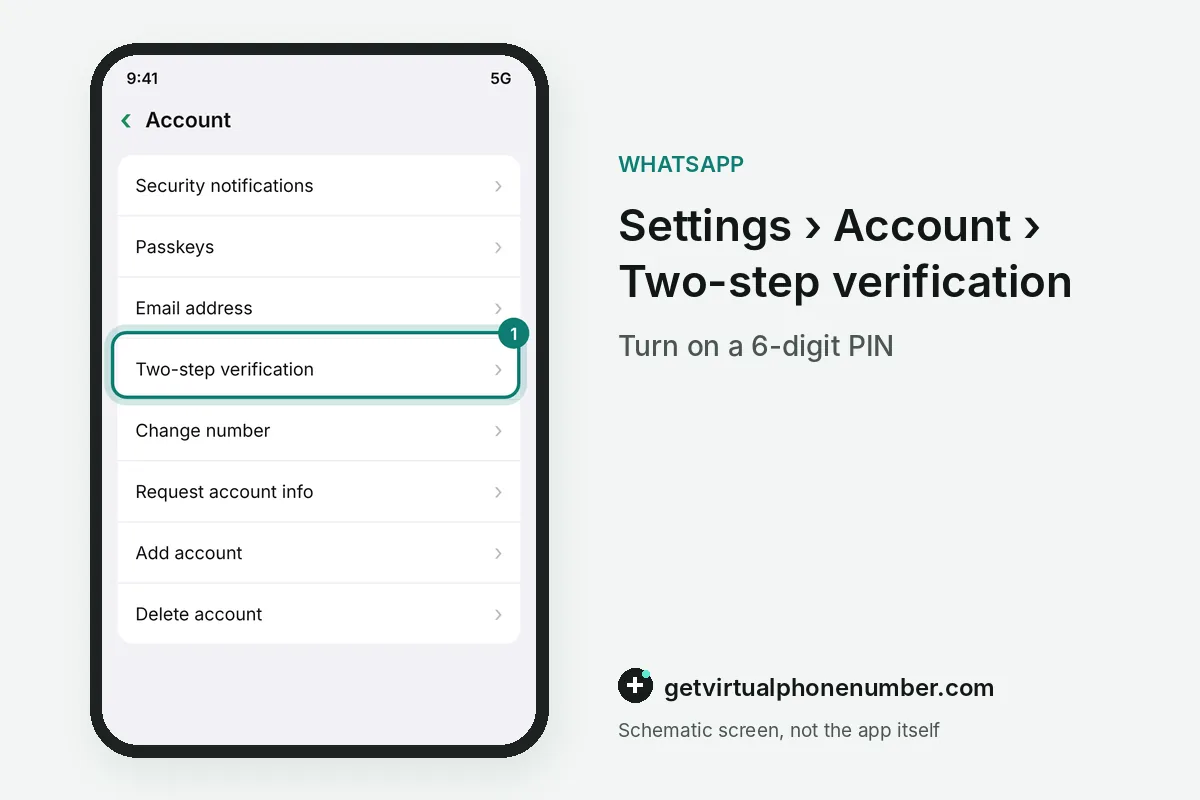
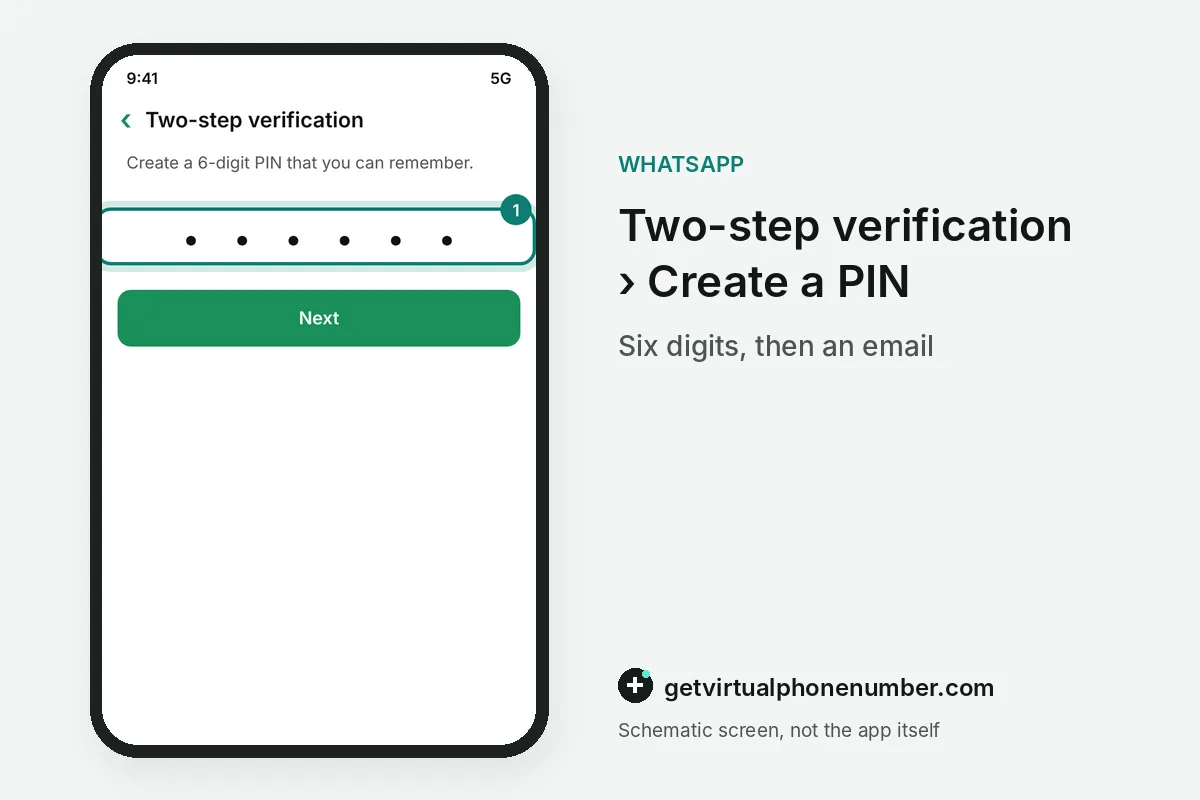
To set up two-step verification on WhatsApp, open Settings with the gear icon on iPhone or the three dots on Android. Then tap Account. Select Two-step verification, tap Turn on, enter a 6-digit PIN twice and add an email address, or skip the email step for now.
WhatsApp Business has the same Two-step verification setting in the same Account menu, and the PIN applies to the number from that moment. A second account on the phone needs a PIN of its own.
Why is WhatsApp asking me for two-step verification?
WhatsApp asks for two-step verification because the PIN was turned on for your number, by you or by someone who registered the number before you. Linked devices never ask. WhatsApp Web, the desktop app and a companion phone connect with a QR code or a one-time code, so the PIN only appears when the number itself is registered again.
A two-step verification request you do not recognise after a phone change is a warning sign of an old takeover. The reset routes are in forgot WhatsApp PIN.
What are the disadvantages of two-step verification on WhatsApp?
The main disadvantage of WhatsApp two-step verification is a lockout when you forget the PIN and never added an email. The reset then waits. WhatsApp's help pages give a waiting period of 7 days, and messages that arrive in between may be lost if the account sits unused.
For example, a PIN forgotten on 3 October 2026 without an email can be reset around 10 October 2026. An email on file removes that week from the WhatsApp two-step verification lockout.
Is the WhatsApp PIN the same as the SMS code?
The WhatsApp PIN and the SMS code are two different secrets, because WhatsApp sends the 6-digit registration code while you choose the PIN yourself. Both matter at registration. The code proves that you hold the number, and the two-step verification PIN proves that you are the person who set up the account on it.
A backup password is a third secret that protects an end-to-end encrypted backup of your chats. The table sets the WhatsApp two-step verification PIN beside the other two.
| Secret | Who sets it | Format | Asked when |
|---|---|---|---|
| Two-step verification PIN | You | 6 digits | The number is registered again |
| Registration code | WhatsApp, by SMS or call | 6 digits | Every registration |
| Backup password or key | You, or a generated key | Password or 64-digit key | An encrypted backup is restored |
Should you add an email to WhatsApp two-step verification?
An email lets WhatsApp send a reset link for a forgotten two-step verification PIN within minutes. WhatsApp does not verify the address. Type it twice with care, because a typo in the email field leaves you facing the full waiting period at the worst possible moment.
Protect that mailbox with its own strong password and two-factor login, since a hijacked mailbox could remove your WhatsApp PIN. The Change email option sits in the same two-step verification menu.
How do you change the WhatsApp PIN or turn off two-step verification?
To change the WhatsApp PIN, go back to Settings, Account, Two-step verification and tap Change PIN or Change email. Turn off works there too. Turning the feature off removes the PIN from future registrations at once, and turning it back on asks for a new PIN and a fresh email.
Keep two-step verification on for test accounts as well, because every visitor of our free WhatsApp numbers can read new registration codes on those public pages. The PIN keeps those visitors out.
WhatsApp two-step verification steps
- Open Account settingsGo to Settings, Account, Two-step verification.
- Tap Turn onEnter a 6-digit PIN and confirm it.
- Add an emailType an address you control so you can reset the PIN.
- Save the PINStore it in a password manager.
 Algeria
 Netherlands
 Moldova
 Sweden
 Canada
 United States
 United Kingdom