WhatsApp · Is WhatsApp safe · Reviewed 3 October 2026
Is WhatsApp safe? What the encryption covers and what it leaves open
WhatsApp is safe for message content: personal chats, calls, status updates and shared location are end-to-end encrypted by default, so not even WhatsApp can read them. The open questions sit around that lock: metadata Meta collects, cloud backups that start unencrypted, and privacy defaults that show your photo to strangers.
What does WhatsApp encrypt by default?
WhatsApp encrypts personal messages, voice and video calls, status updates and live location end to end, using the Signal Protocol. Only you and the people in the chat hold the keys. The WhatsApp privacy summary says that no one else can see this content, and it names WhatsApp itself in that list.
The protection is automatic. It needs no setting and also covers the photos, videos and voice notes you send inside a chat. A WhatsApp message intercepted on the network would be unreadable to whoever took it.
Each chat also has a 60-digit security code, under Encryption in the contact info, that both people can compare in person. WhatsApp added Key Transparency in 2023 to check those keys automatically.
What is the privacy risk in WhatsApp metadata?
WhatsApp can see your account data that sits outside encryption. That means your phone number, profile name, profile photo, About text, contact list, group memberships and settings, and its own privacy page states that these items are not end-to-end encrypted.
WhatsApp also collects technical data about your device, your connection and your general location, such as the country. This metadata shows who you talk to on WhatsApp, when and how often. A WhatsApp chat can be safe in content and still reveal a visible relationship.
Is WhatsApp safe from government access?
WhatsApp is safe from government reading of message content, because end-to-end encryption leaves no readable copy on WhatsApp servers. Metadata is the weaker side. Avast and Proton both note that it can be handed to authorities when the law requires it.
Privacy researchers add that metadata can be matched with other data, such as a reused profile photo, to identify a person. For most people the practical step is limiting what strangers can see on the WhatsApp profile, which the settings table below covers.
Is WhatsApp safe for sending private photos?
WhatsApp is safe for private photos in transit, because media inside a chat is end-to-end encrypted like text. The risk starts once the photo lands on the other phone. WhatsApp itself reminds users that the person you chat with can take screenshots or recordings and pass them on to other people. Trust still matters.
WhatsApp view once media and disappearing messages reduce what stays on the other device. Disappearing messages can be set to 24 hours, 7 days or 90 days. Neither WhatsApp feature stops a second camera pointed at the screen, so trust in the recipient decides how safe a sensitive image really is.
For example, a WhatsApp chat set to 7-day disappearing messages clears each message 7 days after it is sent. Screenshots still escape that WhatsApp timer.
Are WhatsApp backups as safe as the chats?
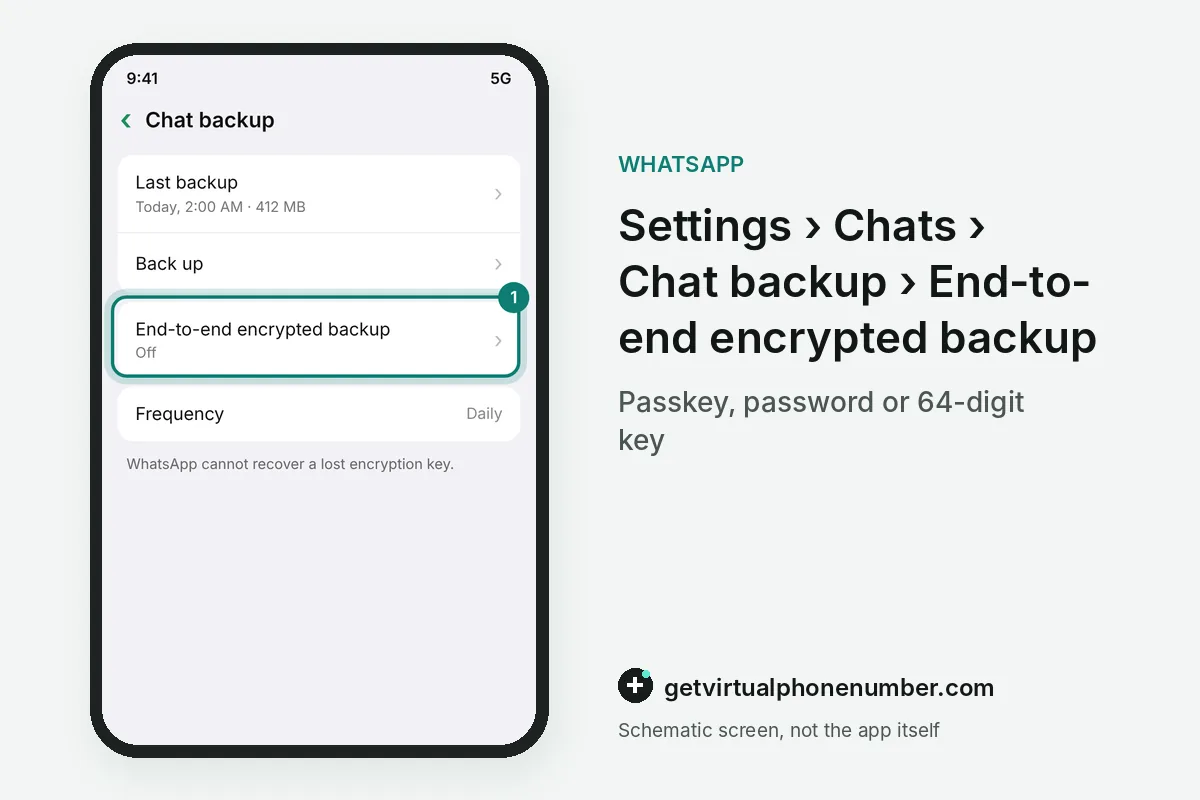
WhatsApp backups are less safe than the chats by default, because copies saved to Google Drive or iCloud are not end-to-end encrypted until you turn that on. Anyone who gets into that cloud account could reach the history your encryption protected.
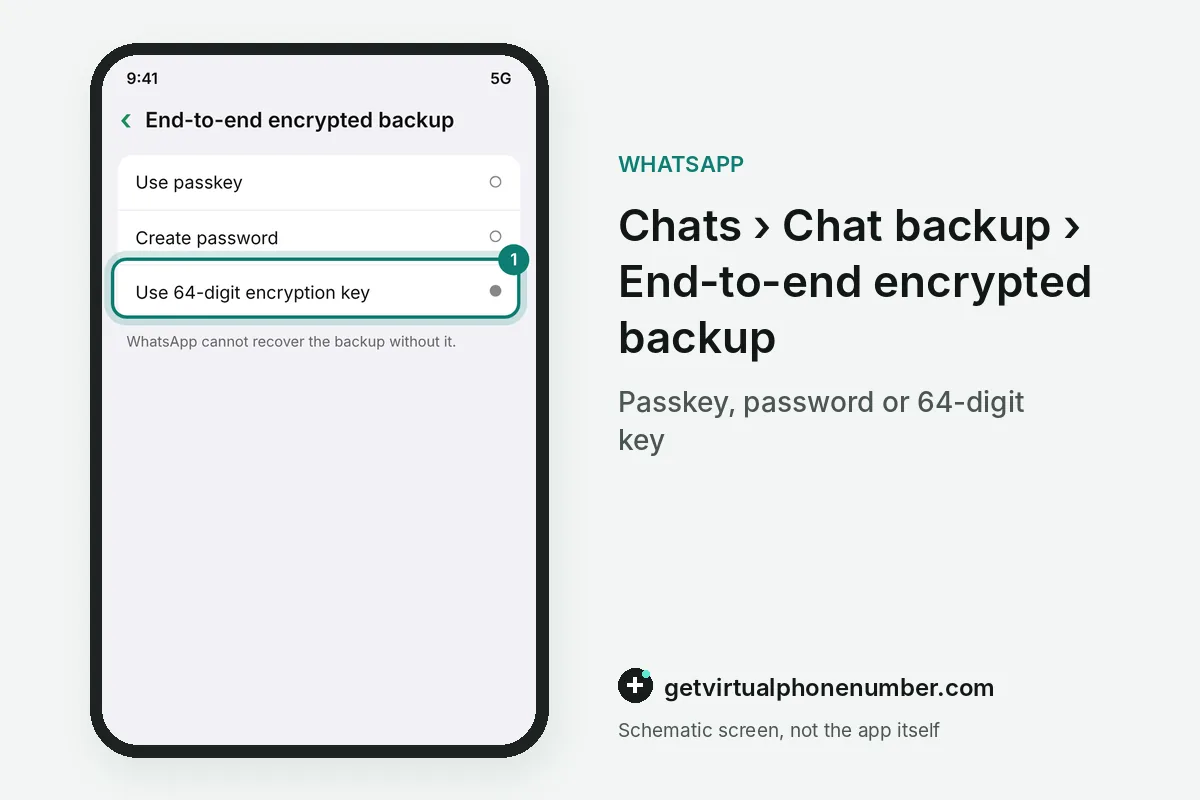
The fix sits under Settings, Chats, Chat backup, then End-to-end encrypted backup. WhatsApp protects that backup with a passkey, a password or a 64-digit encryption key. Keep the key somewhere safe, since WhatsApp cannot recover the backup without it.
Default WhatsApp privacy settings and safer choices
Out of the box, any WhatsApp user can see your profile photo, read receipts and online status, and anyone can add you to a group. Your contacts see your status updates, About text and last seen. Unknown callers can ring you.
The table compares each WhatsApp default with a tighter choice, and most of them sit under Settings, then Privacy. Group members can always see each other's phone numbers, and WhatsApp says hiding them is not possible at this time.
Your phone number itself stays visible to everyone you chat with, so a second number keeps the main SIM private. For an account you keep, use a private number (coming soon) that receives the WhatsApp code only for you. Free public lines on our WhatsApp page show every code to every visitor.
| WhatsApp item | Encrypted end to end | Who sees it by default | Tighter choice |
|---|---|---|---|
| Messages, calls and media | Yes | Only the people in the chat | Turn on disappearing messages |
| Profile photo | No | Any WhatsApp user | My contacts |
| Last seen and About | No | Your contacts | Nobody |
| Group invites | No | Anyone can add you to a group | My contacts |
| Cloud chat backup | Only after you turn it on | Stored on Google Drive or iCloud | Encrypted backup protected by a 64-digit key |
Which advanced WhatsApp privacy settings are worth turning on?
Four WhatsApp privacy settings close gaps the defaults leave open. Three sit in the Privacy screen among the advanced options: IP protection in calls, link previews, and a block on floods of messages from unknown accounts. Use them together.
Restricted chat limits the use of unofficial clients or AI agents inside an individual or group chat. Chat lock hides chosen conversations behind your phone passcode, Face ID, fingerprint or a secret code. People who may face targeted attacks can turn on strict account settings, which apply the tightest privacy and security controls WhatsApp offers.
Account takeovers and code theft are a separate problem from privacy, and our hacked account guide covers them step by step. Modded WhatsApp clients undo every setting on this page, because WhatsApp cannot validate their security.
Run a WhatsApp privacy checkup in six moves
- Open Settings, then PrivacyEvery visibility control in WhatsApp sits on this one screen, and the privacy checkup there walks through them in order.
- Limit last seen and onlineSet last seen and online to My contacts or Nobody. Hiding yours also hides other people's from you.
- Restrict profile photo and AboutChoose My contacts so strangers who get your number see neither your face nor your About text.
- Control group invitesSet Groups to My contacts, which stops unknown accounts adding you to group chats.
- Silence unknown callersTurn this on so calls from numbers outside your contacts stop ringing the phone.
- Encrypt the chat backupIn Chat backup, turn on End-to-end encrypted backup and store the key yourself. The account-level protections sit in our two-step verification guide.
Sources
- Is WhatsApp safe? Not according to its ex-security chief | Proton
- What Parents Need to Know: Is WhatsApp Safe for Children?
- Security Features, Safety Tools & Tips | WhatsApp
- Is WhatsApp Safe to Use? Explore Risks and How to Stay Protected
- Account security tips | WhatsApp Help Center
- How to change your privacy settings | WhatsApp Help Center
 Canada
 United States
 Netherlands
 Sweden
 Algeria
 Philippines
 Sri Lanka
 Slovenia
 United Kingdom