Telegram · Multiple accounts · Updated 3 October 2026
Telegram Multiple Accounts: Limits and Switching
Telegram multiple accounts live inside one official app, which keeps up to 3 accounts signed in at once, or 4 with Telegram Premium. Each account needs its own number. Switching between Telegram accounts takes a single tap, and every profile keeps its own chats, folders, contacts and notification settings.
How many Telegram accounts can you have in one app in 2026?
In 2026 one Telegram app holds 3 accounts at the same time, and a Telegram Premium subscription adds a fourth slot. Telegram sets no limit per person. Phone numbers are the real ceiling, because Telegram registers exactly one account on each number and every extra profile needs another line.
Telegram added account switching on Android on 30 December 2017 and the fourth Premium slot in June 2022. The limit counts accounts signed in to one app, and logged-out accounts keep existing on their numbers.
How do you add another account in Telegram?
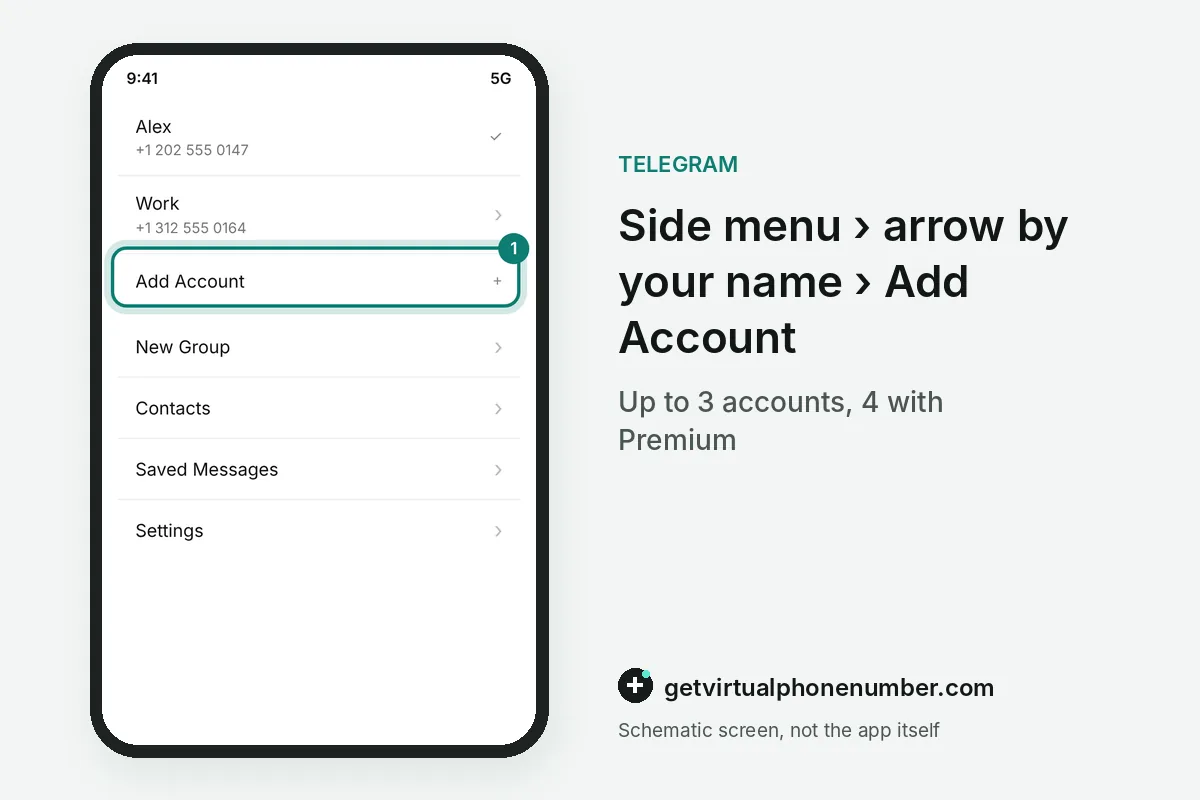
To add another account in Telegram on Android, open the side menu and tap the arrow next to your name. Then choose Add Account. Telegram opens the usual sign-in screen, where the next phone number and its login code attach a second profile without touching the first one.
On iPhone the Add Account item sits in Settings under Edit, and Telegram Desktop shows it in the side menu beside the current account name. Each new Telegram account starts with its own empty chat list.
Can I have two Telegram accounts on my iPhone?
Two Telegram accounts fit on one iPhone inside the same app, and a third one fits as well. Hold the Settings tab to switch. The account switcher opens with a long press, so there is no second app to install and no need to sign out of the first profile.
Telegram multiple accounts keep separate chats, folders, Saved Messages and privacy settings on the iPhone. Logging out of one profile leaves the others signed in on the same device.
How do notifications work with Telegram multiple accounts?
Notifications from Telegram multiple accounts arrive on the same phone, and each alert carries the account name. You always see the receiving profile. Muting a whole work or test account in Notifications and Sounds keeps that profile quiet while your personal chats still ring as usual.
Archived chats and chat folders calm a busy profile further, and every account remembers its own folder setup. Telegram Desktop shows a counter for each signed-in account next to its picture.
Can you run more than 4 Telegram accounts on one phone?
More than 4 Telegram accounts on one phone need a second app. Telegram X is the official option. Telegram X keeps its own list of signed-in profiles, so the main app and Telegram X together give a phone room for several more accounts without any modified software.
Third-party clients also hold extra profiles, yet Telegram watches accounts that sign in through unofficial clients. Read Telegram X vs Telegram before installing one.
Why can Telegram restrict multiple accounts?
Telegram restricts multiple accounts that appear in bulk or send automated messages. Normal personal use is safe. The rules for the Telegram API ban flooding, spam and fake subscriber counters, and accounts that break them can lose access to the platform for good.
For example, a free user with 3 accounts who taps Add Account again is offered Telegram Premium first. Every extra profile needs a reachable number, and our free Telegram numbers suit short tests only.
Telegram add account steps
- Open the account switcherAndroid: side menu and the arrow by your name. iPhone: Settings, then Edit.
- Choose Add AccountTelegram opens the sign-in screen for a new number.
- Enter the next numberEach account needs a different phone number.
- Type the codeConfirm the number with the code from SMS or another device.
- Set notificationsMute or adjust alerts for the new account in its settings.
 Algeria
 Netherlands
 Moldova
 Sweden
 Canada
 United States
 United Kingdom