Telegram · Unofficial apps · Updated 3 October 2026
Telegram X vs Telegram: Which App Is Safe
Telegram X vs Telegram compares two official apps from the same company, where Telegram is the main app and Telegram X is an alternative client built on TDLib. Both open the same account. Unofficial third-party clients form a separate third group with real risks, since anyone can build one on the open API.
What is the difference between Telegram and Telegram X?
The difference between Telegram and Telegram X lies in the code base and the design, while the account and the chats stay the same. Telegram X feels lighter. The alternative client uses fluid animations and a minimalist interface, and it separates chats and calls into different tabs by default.
The main Telegram app gets new features first and covers every platform, from Android to Telegram Desktop. The table adds a typical unofficial client to the Telegram X vs Telegram comparison.
| App | Made by | Built on | Account risk |
|---|---|---|---|
| Telegram | Telegram | Official open-source apps | None from the app |
| Telegram X | Telegram | TDLib | None from the app |
| Unofficial client | Third parties | Telegram open API | Observation, possible ban |
Is Telegram X safe?
Telegram X is safe when it comes from Google Play or telegram.org, because Telegram publishes it under its own name. The same encryption applies. Fake copies that borrow the Telegram X name and icon are the real danger, and they usually live on download sites outside the official stores.
The official apps page lists Telegram X apart from the main apps as an experimental client built on TDLib, the Telegram Database Library. New Telegram features reach Telegram X later.
Why do people use Telegram X?
People use Telegram X for its speed and design, since the client runs smoothly even on older Android phones. The animations feel fluid. Separate tabs for chats and calls, a compact chat list and a night mode that switches itself on also draw users from the main Telegram app.
Telegram X can sign in to the same account as Telegram on one phone, which makes it an easy way to compare the two apps before you pick one. Your chats appear in both apps.
Which official apps does Telegram publish?
The official Telegram apps exist for Android, iPhone, iPad, Windows, macOS, Linux and the web, and Telegram X joins that list. All come from telegram.org. Their open-source code supports reproducible builds, so researchers can check that the store version matches the published code line by line.
Download every Telegram app from telegram.org/apps, the App Store or Google Play. Apps from any other source count as unofficial third-party clients.
Why are unofficial Telegram apps risky?
Unofficial Telegram apps hold your whole session, so a malicious build can copy every chat, contact and file. Kaspersky found such mods in 2023. The modified Telegram apps sat on Google Play under harmless names and sent messages, contacts and phone numbers to their authors.
The Telegram mods Kaspersky found reached tens of thousands of installs before Google removed them. Their code differed only slightly from the official Telegram app, which helped them pass store checks.
Can unofficial Telegram apps get your account banned?
Unofficial Telegram apps can get an account restricted, because Telegram watches every account that signs in through a client on the open API. Abuse ends in a permanent ban. Flooding, spam and fake subscriber counters are the behaviours that the API terms forbid for third-party clients.
Normal chats in a well-known third-party client rarely cause trouble, yet the official Telegram apps carry no such risk. Telegram multiple accounts lists the official limits.
How do you check a Telegram app before installing it?
Check a Telegram app by opening its link from telegram.org/apps and comparing the developer name in the store. Fakes copy icons closely. Promises of ghost modes, hidden reading or extra speed are a warning sign, since the official apps never advertise features like these.
For example, the mods found in 2023 were advertised as faster versions of Telegram. Tests on our free Telegram numbers should never share a phone with your main Telegram account.
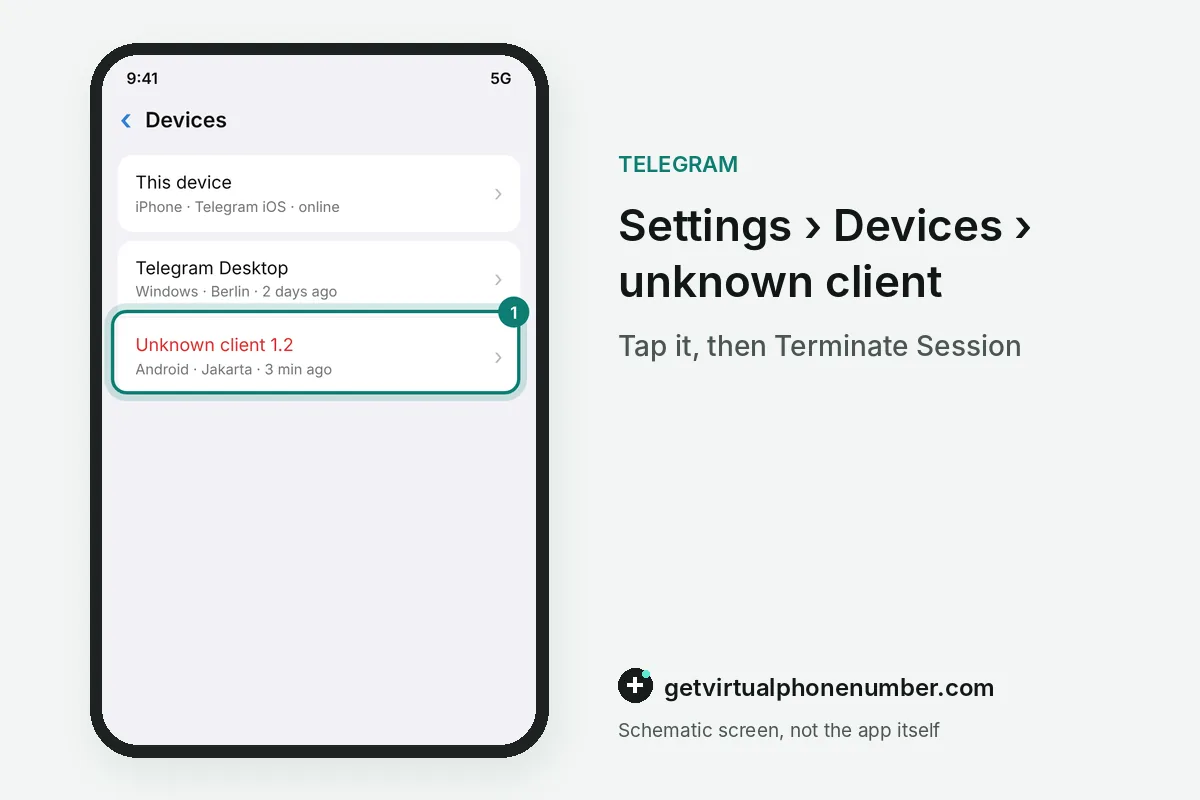
Steps to move from an unofficial client to official Telegram
- Install the official appGet Telegram or Telegram X from telegram.org/apps, the App Store or Google Play.
- Log in with your numberYour cloud chats load from the server.
- End other sessionsIn Devices, terminate the unofficial client and unknown sessions.
- Change the cloud passwordSet a new password and check the recovery email.
 Algeria
 Netherlands
 Moldova
 Sweden
 Canada
 United States
 United Kingdom