Telegram · Delete account · Reviewed 3 October 2026
How to Delete a Telegram Account Permanently
To delete a Telegram account, open the deactivation page at telegram.org/deactivate, enter your number and type the confirmation code that arrives inside the Telegram app. The deletion is immediate. Accounts that stay offline for the whole self-destruct period, 18 months by default, are deleted by Telegram without any request.
Where is the delete account button on Telegram?
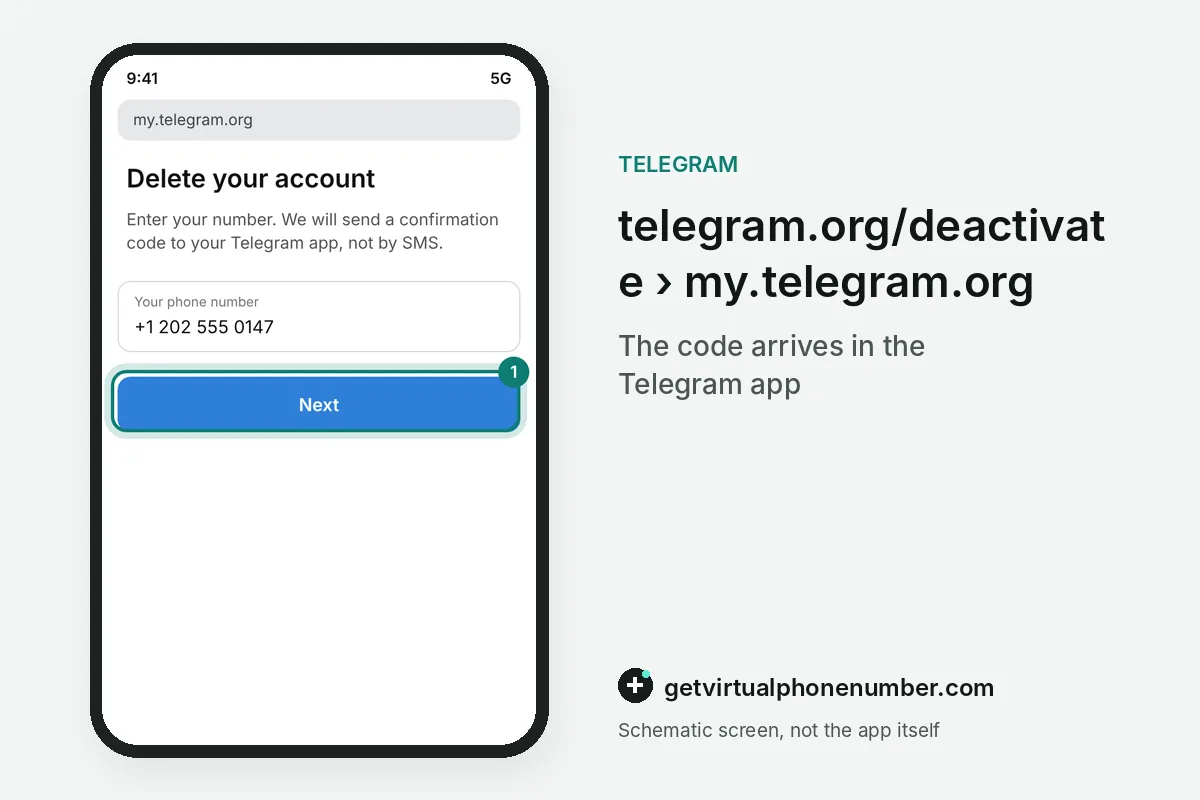
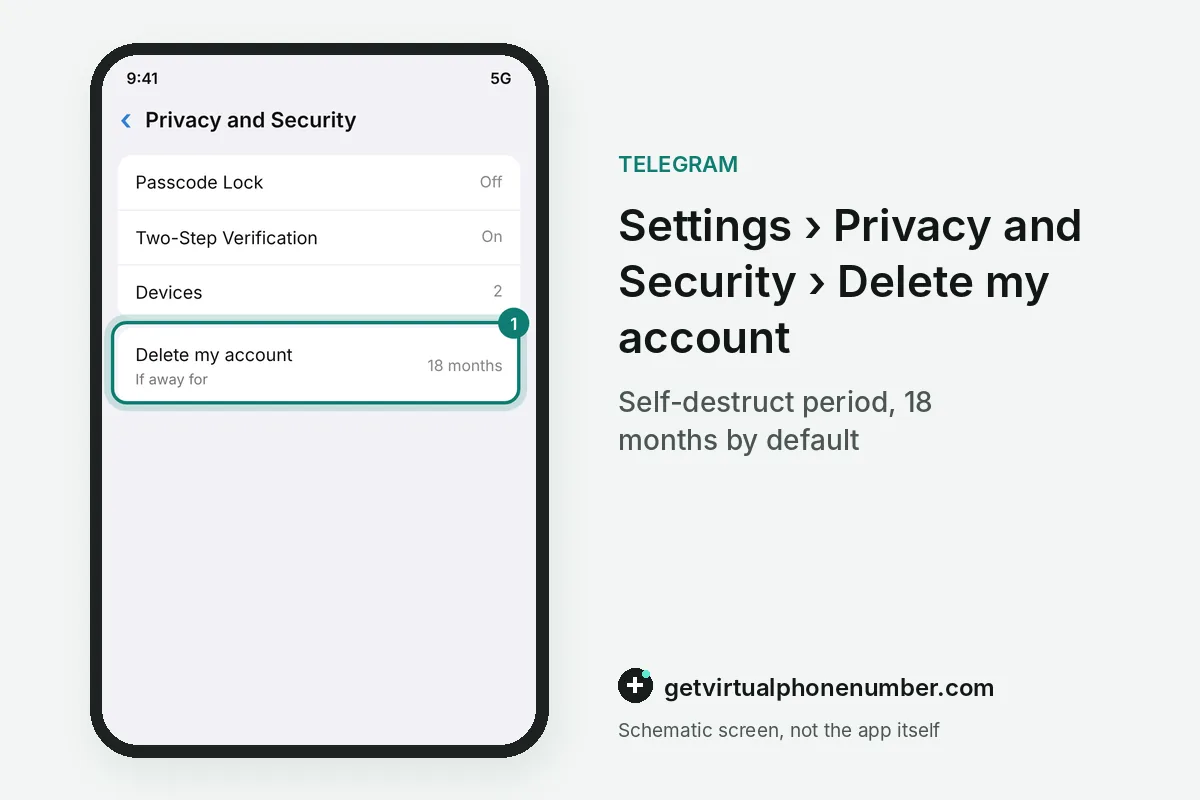
The Telegram delete account button sits on the deactivation page, telegram.org/deactivate, which opens my.telegram.org in any browser. Recent apps add a shortcut. The shortcut lives in Settings, Privacy and Security, right next to the self-destruct period, and it opens the same deletion flow.
Telegram suggests a computer browser for the deactivation page, because you read the code in the Telegram app while the page stays open on the other screen. A phone works too if you switch between the browser and the app quickly.
How do you delete a Telegram account on the Deactivation Page?
To delete a Telegram account on the Deactivation Page, enter your phone number in international format with the country code and click Next. Check the Telegram app. The confirmation code comes from Telegram itself inside the app, and you enter that code on the page to reach the deletion form.
Choose Delete Account, add a reason if you wish and confirm. Every signed-in phone, tablet and computer logs out a moment later, and Telegram Web sessions close as well.
What happens when you delete a Telegram account?
Deleting a Telegram account removes its messages, contacts and group memberships from Telegram's servers. Nothing can be restored. A later sign-up with the same number starts an empty account, and people who have your number see you join Telegram again as a new user.
Groups and channels you created keep running without a creator after you delete the Telegram account, and their admins keep their rights. Contacts see your old chats under the name Deleted Account.
How does Telegram self-destruct inactive accounts?
Telegram deletes an account that stays offline for the whole self-destruct period, which is 18 months by default. Settings changes the period. The option sits in Privacy and Security under the name of the inactivity timer, and any login before the deadline restarts the countdown from zero.
For example, a Telegram account last opened on 3 October 2026 self-destructs in April 2028 under the default timer. Uninstalling the app alone keeps the account alive until then.
Why does the code to delete a Telegram account not arrive?
The code to delete a Telegram account never comes by SMS, because my.telegram.org sends it into the Telegram app. Open the app first. The message comes from the official Telegram service account and lands in the chat list of the account you are deleting.
With no signed-in device, log in once with the normal SMS code and return to the deactivation page. Several wrong attempts trigger a waiting period before the page sends a new code.
How do you hand over channels before you delete a Telegram account?
To hand over channels before you delete a Telegram account, open each channel's admin list and choose Transfer Ownership for a trusted admin. Telegram sets two conditions. Two-step verification must be on for at least 7 days, and the current session must be older than 24 hours.
Owners who delete the Telegram account without a transfer leave channels with admins only, and some owner rights then belong to nobody. Plan the transfer a week ahead if the cloud password is new.
Can you delete Telegram messages without deleting the account?
You can delete Telegram messages without deleting the account, because every chat has its own auto-delete timer. Telegram added it on 23 February 2021. The first timer options erased new messages for everyone in the chat after 24 hours or 7 days, while older history stayed untouched.
A long press on any message or chat also deletes it for both sides, which often solves the problem without removing the whole Telegram account. Throwaway tests belong on our free Telegram numbers.
What should you save before you delete Telegram?
Before you delete Telegram, export chats, media and contacts with Telegram Desktop under Settings, Advanced, Export Telegram data. The archive uses HTML or JSON. Telegram Premium bought in the App Store or Google Play is billed by the store, so cancel the subscription there before the Telegram account disappears.
Saved Messages, photos and voice notes fit into the same Telegram Desktop export, which stays on your computer after you delete the Telegram account. Check the folder before you confirm.
Telegram account deletion steps
- Open the deactivation pageGo to telegram.org/deactivate on a computer browser.
- Enter your numberUse the full international format of the account's number.
- Type the code from the appThe code arrives in the Telegram app, never by SMS.
- Choose Delete AccountAdd a reason if you want and confirm the deletion.
 Algeria
 Netherlands
 Moldova
 Sweden
 Canada
 United States
 United Kingdom