Netflix · Delete account · Facts verified 3 October 2026
How to Delete Your Netflix Account Permanently
To delete a Netflix account, open the Security section of the Account page, select Delete account, pass the Security Check and choose Permanently Delete. An email confirms the request. An active membership is canceled at the end of the billing period, and the account is deleted after that.
How do you use Delete account and the Security Check on the web?
To use Delete account on the web, go to Netflix, sign in and open the Security section of the Account page. The option sits there. Select Delete account, complete the Security Check, tick the confirmation box and select Permanently Delete, and Netflix sends a confirmation email.
To delete the account, click or tap on your Netflix profile icon and select Account to reach that page. Verify your identity using the code sent to your email or phone during the Security Check.
The Security Check for deleting a Netflix account sends a code to the email or phone number on the account. Keep both reachable during the process, or the check cannot finish.
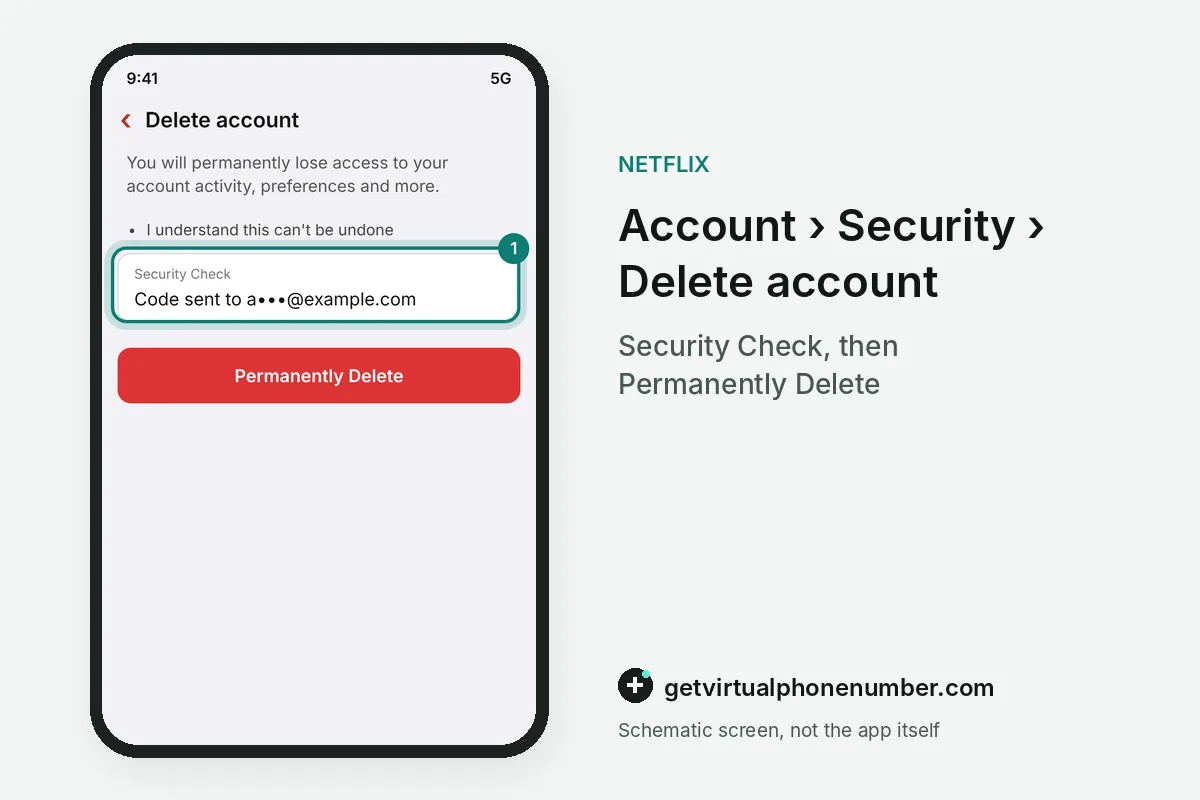
How do you delete a Netflix account in the app?
To delete a Netflix account in the app, open the Netflix app, go to My Netflix, tap your profile name and select Account. Delete account sits under Settings near the bottom. Verify your identity using the code sent to your email or phone, tick the box and tap Permanently Delete.
The app and the website reach the same account, so either route closes it on every Netflix device. The confirmation arrives by email in both cases.
What happens when you delete a Netflix account?
Deleting a Netflix account removes access to your account activity, preferences and profiles for good, so viewing history and recommendations are gone. A comeback means a new account. Netflix states that you need to sign up again after a permanent deletion to use the service.
A deleted Netflix account stays open until the end of your current billing period, so you can still use it until then. For example, a request on 3 October 2026 with renewal on 15 October 2026 keeps it usable until 15 October.
Does canceling Netflix delete the account?
Canceling Netflix does not delete the account right away, because a canceled account stays stored and can be restarted later. Under the Membership section, select Cancel membership to stop billing. Netflix's help center says it automatically deletes accounts 24 months after the membership was canceled.
Many guides still say Netflix deletes inactive accounts 10 months after cancellation, a figure older than the current help page. Deleting it yourself clears the data sooner than that. The table compares the three ways to step away from Netflix.
| Action | Where | What stops | What stays |
|---|---|---|---|
| Sign out of all devices | Manage access and devices | Every TV, phone and browser session | Plan, billing, profiles |
| Cancel membership | Membership section | Monthly billing at period end | Profiles for 24 months |
| Delete account | Security section | Everything after the billing period | Nothing, sign-up needed again |
Can you keep a Netflix profile before you delete the account?
You can keep a Netflix profile before you delete the account by moving it with Profile Transfer to a new or existing account. History travels along. The profile name, recommendations, viewing history, My List, game saves and settings move with it, according to the Netflix help page on transfers.
Primary profiles cannot move into an extra member slot on Netflix, and a transfer into such a slot works only while the slot is being purchased. Finish any transfer before the account closes.
Game saves and My List entries live inside each profile, so a family can move a teenager's profile to a new Netflix account and keep progress in Netflix games. The Netflix Help Center lists game saves among the transferred items.
What data does Netflix keep after an account is deleted?
Netflix keeps some personal data after an account is deleted where laws, billing or record rules require it, according to its help page on retention. Receipts are a typical case. Payment records can outlive the profiles, history and preferences that disappear with the account itself.
Someone who finds their email on an account they never created can write to privacy@netflix.com and ask for its removal. The privacy team handles those requests apart from normal account deletion.
People who only want privacy on a shared TV can hide titles from a profile's viewing activity on Netflix. The account and everyone else's profiles stay untouched.
Can you undo a Netflix account deletion?
You can undo a Netflix account deletion from the Account page at any time before the current billing period ends. After that it is final. The account and its profiles cannot be restored once the permanent deletion runs, so keep nothing you still need inside it.
Ask for the undo before the renewal date shown on the Account page. That date is the last day the Netflix account deletion can be reversed by you. Test accounts made on our free numbers for Netflix are better deleted before you leave the line.
What if you can't sign in to delete the Netflix account?
Deleting a Netflix account you can't sign in to starts with getting back in through netflix.com/LoginHelp. Reset the password first. The card on the account recovers access when the email and phone are lost, and then the Delete account option works as usual.
You can also contact Netflix support via live chat or phone and ask an agent to close the account and delete your personal data. Netflix password reset covers lockouts before that step.
Steps to delete a Netflix account
- Open Account, then SecurityOn the web, or via My Netflix and your profile name in the app.
- Select Delete accountNetflix starts a Security Check.
- Pass the Security CheckEnter the code sent to your email or phone.
- Choose Permanently DeleteTick the box and wait for the confirmation email.
 Algeria
 Netherlands
 Moldova
 Sweden
 Canada
 United States
 United Kingdom