Netflix · Hacked account · Updated 3 October 2026
Netflix Account Hacked: What to Do Now
A hacked Netflix account shows unknown sign-in alerts, strange profiles or a changed email, and the fix starts with a new password and Sign out of all devices. Netflix has no separate two-factor setting. A locked-out owner recovers the account with the card on file or through Netflix support.
Which sign-in alerts show a hacked Netflix account?
The sign-in alerts that show a hacked Netflix account are logins from unknown devices, while new profiles and odd titles in viewing activity confirm it. Emails tell you first. Netflix sends a message for every new sign-in from a new device and another one whenever the account email changes.
The location in a sign-in alert comes from the IP address, so a nearby city is often harmless. A different country together with unknown profiles points to a hacked Netflix account.
Which password steps help if you can still log in to the hacked account?
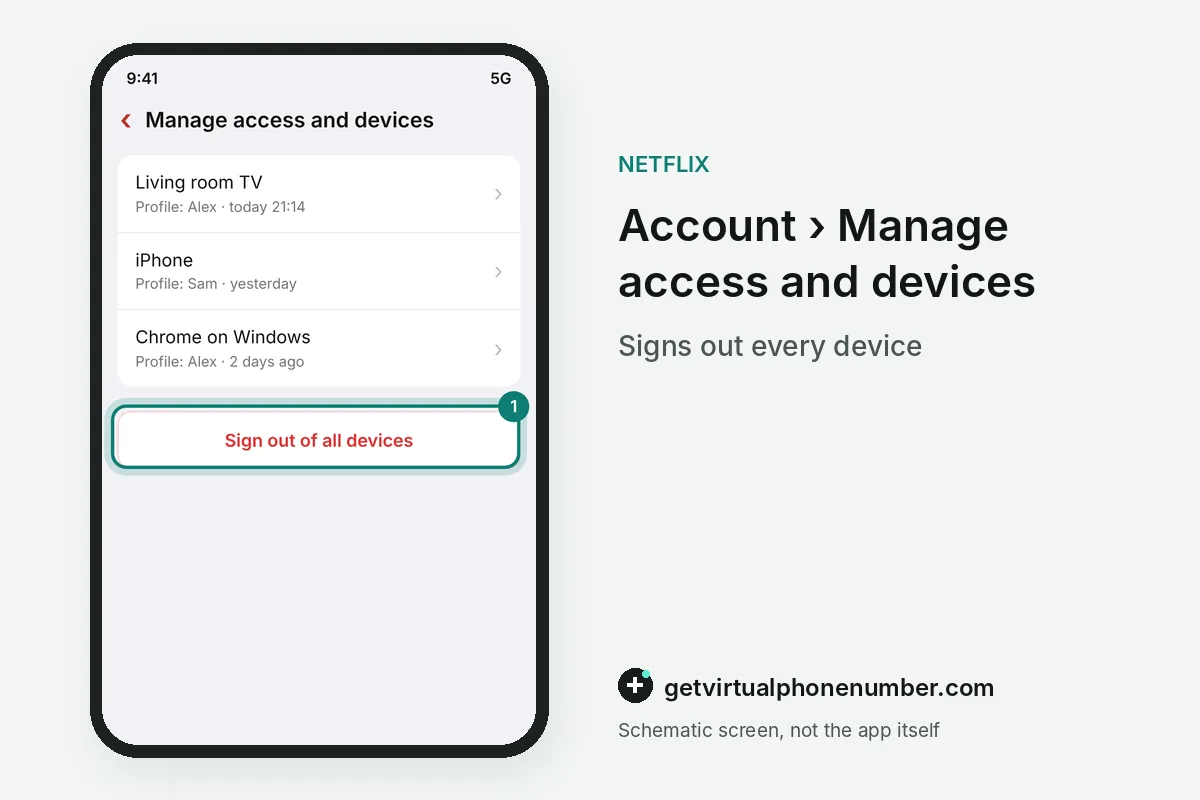
If you can still log in to the hacked account, go directly to Netflix to change your password and select Sign out of all devices. Speed matters here. Every old session must then sign in again with the new password, which shuts out the hacker on TVs, phones and browsers at once.
Go to your account settings and pick a strong, unique password. Go to account settings again and click Sign out of all devices to kick out the hacker.
Review recent streaming activity on the hacked Netflix account and remove any strange payment methods or unfamiliar profiles. Both often appear after a takeover.
What if you are locked out of a hacked Netflix account?
If your email or password has been changed and you are locked out of the Netflix account, take immediate action. Start with the login page and the card recovery.
Go to the official login page and click Forgot your password to see if you can recover it via your phone number or email. The reset fails when the hacker replaced both, which leads to the card route.
If the hacker changed your email address, contact Netflix support by phone or chat to verify your billing details and restore the account. The card recovery at netflix.com/LoginHelp, with your name and card number, often works first.
How do you remove someone from a hacked Netflix account?
To remove someone from a hacked Netflix account, open Manage Profiles on the Account page and check every profile for an email address you do not recognise. Delete those emails. Anyone using them is signed out within 24 hours, according to Netflix's help page on new sign-ins.
For example, a stranger's profile email removed on a hacked Netflix account at 18:00 loses access by 18:00 the next day. Delete the stranger's profile afterwards so recommendations and history stay yours.
Why do Netflix accounts get hacked?
Netflix accounts get hacked mostly through passwords reused from other sites, phishing emails and texts, and malware on shared computers. Leaked logins get tested in bulk. A password from another service's breach often opens Netflix within days, because the same email and password pair works there too.
Fake billing messages are the second door, covered in Netflix scam emails and texts. Netflix never asks for passwords or card numbers in a text or email.
Removing a profile email signs that person out within 24 hours, and Manage access and devices shows streams from the last 90 days. Together those 2 views reveal a quiet intruder on the Netflix account.
How do you protect a Netflix account after a hack?
Protect a Netflix account after a hack with a unique password, a verified phone number and a monthly look at Manage access and devices. Recovery needs a phone. Netflix's own security tips ask members to add a phone number, so a stolen password can be reset by text in minutes.
Netflix asks for at least 8 characters, and some guides suggest 10 to 12 for extra safety. Call your bank or credit card company if the hacker might view or use your saved payment information. Codes on our free numbers for Netflix are visible to every visitor, so keep recovery on your own number.
Steps to secure a hacked Netflix account
- Change the passwordPick a unique password of at least 8 characters.
- Sign out of all devicesKeep the box checked or use Manage access and devices.
- Clean up profilesRemove unknown profile emails and profiles.
- Recover or reportLocked out, use netflix.com/LoginHelp with your card or contact Netflix.
 Algeria
 Netherlands
 Moldova
 Sweden
 Canada
 United States
 United Kingdom