Netflix · Password reset · Checked on 3 October 2026
Netflix Password Reset: How to Reset or Change It
A Netflix password reset starts at netflix.com/LoginHelp, where you choose an email link or a text message code. The email link lasts 24 hours. The text code expires after 20 minutes. Both routes end with a new password and an option to sign out of all devices on the account.
How do you reset your Netflix password by email on netflix.com/LoginHelp?
To reset your Netflix password by email, open netflix.com/LoginHelp, choose Email, enter the address and select Email Me. A reset message follows. Open it, including the spam folder if needed, and select Reset your password to create a new one twice on the page that opens.
The reset link stays valid for 24 hours, so a message found the next evening may already be dead. Request a fresh link when the page reports an expired link.
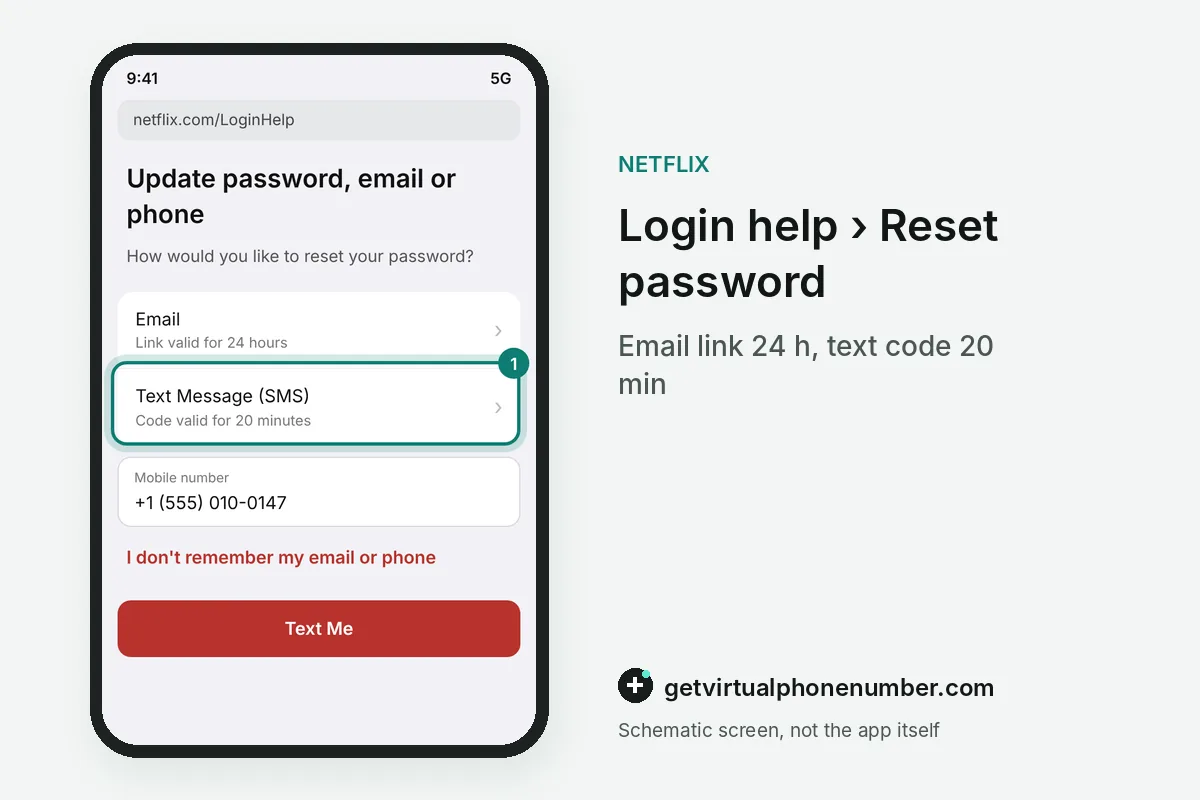
How do you reset your Netflix password with a Text Message code?
To reset your Netflix password with a Text Message code, choose that option on netflix.com/LoginHelp, enter the phone number on the account and select Text Me. A verification code arrives. Type it, select Verify and set the new password, which works only when the number was saved on the account earlier.
For example, a code texted at 10:00 expires at 10:20, so finish the reset in one sitting. A missing text is a delivery problem, explained in Netflix code not received.
How do you change a known Netflix password and Sign out of all devices?
To change a known Netflix password and sign out everywhere, open Account, find the Security section and choose Change Password. Type the current password once. Enter the new password twice and save, and leave the Sign out of all devices box checked so every old session has to sign in again.
On iPhone the app opens a browser page for the change. Netflix recommends keeping that box checked after any password change, since a stolen password stays useful on devices that remain signed in.
What are the Netflix password rules?
The Netflix password rules ask for at least 8 characters with a mix of uppercase and lowercase letters, numbers and symbols. Easy guesses fail. Netflix rejects passwords like password or 12345678, anything built from personal details and the password you used just before.
Use a password that you do not reuse on any other site, because leaked passwords from other services are the usual way into Netflix accounts. A password manager stores it and fills it in on every device.
Shared family accounts work well with one adult who owns the password and hands out profiles, while kids and guests never learn the login itself. TVs stay signed in after the owner types it once.
How do you reset the Netflix password without email or phone?
Resetting the Netflix password without email or phone works with the card that pays for the account. Open netflix.com/LoginHelp first. Select I don't remember my email or phone, enter your first name, last name and the card number, and Netflix sends a reset email to the address on file.
An unknown address in that step means someone changed the account email, which Netflix account hacked covers. Gift card and partner billing accounts contact Netflix support instead.
What happens to profiles and TVs after a Netflix reset?
Profiles, viewing history and My List stay exactly as they were after a Netflix reset, because the change touches the login only. TVs behave differently. A television that was signed out asks for a code or a QR scan from your phone, and the profiles reappear right after.
Profiles keep their own subtitles, language and download settings on Netflix, so the family finds everything in place once the devices sign back in. Nothing has to be set up again.
Why is a public number a weak recovery line for Netflix?
A public number is a weak recovery line for Netflix because every text that reaches it, including reset codes, appears on a page that anyone can open. Strangers read those pages daily. Our own public lines show each SMS in full, which suits a quick test and fails any account worth keeping.
Put your own mobile number on the account for password resets. Keep free numbers for Netflix for throwaway tests that you delete afterwards.
Can you sign in to Netflix without the password after a reset?
You can sign in to Netflix without the password on most screens, using a 4-digit code that works for 15 minutes. TVs pair with a phone. The TV shows a code and a QR code, and a phone that is already signed in confirms it.
Password sign-in still matters for the account owner, since only the owner's email or phone can use the Use password instead option. Netflix sign-in code explains the codes in detail.
How do leaked passwords from other sites put Netflix at risk?
Leaked passwords from other sites put Netflix at risk because attackers feed breached email and password pairs into streaming logins by the thousands. One reused password is enough. A shopping site breach from years ago can still open a streaming account today when the same pair was never changed.
Breach alert services and the built-in checks of most password managers flag reused or exposed logins. Replace any flagged entry that matches your Netflix password first, then the rest.
How do you keep a new Netflix password safe on shared TVs?
Keep a new Netflix password safe on shared TVs by signing in with a code or QR code there, so the password never touches a hotel or holiday-flat remote. Guests watch your screen. A TV sign-in through your own phone leaves nothing behind that the next visitor could read or reuse.
Sign out of rental and hotel TVs before you leave, or remove them later in Manage access and devices. A Netflix password typed on a stranger's device belongs in the next password reset.
Why can't I change my Netflix password?
A Netflix password change fails when the current password is wrong, the new one breaks the rules or a Kids profile is active. Read the error message closely. Expired reset links and codes produce the same dead end, so request a new link or code and use the latest one only.
Add a phone number before trouble starts, because a verified number gives every Netflix password reset a second route. The number has to be yours, which the section on public numbers above explains.
Steps for a Netflix password reset
- Open netflix.com/LoginHelpChoose Email or Text Message.
- Request the link or codeSelect Email Me or Text Me.
- Use it in timeEmail links last 24 hours, text codes 20 minutes.
- Set and secure the passwordEnter it twice and keep Sign out of all devices checked.
 Algeria
 Netherlands
 Moldova
 Sweden
 Canada
 United States
 United Kingdom