Tinder · Ban appeal and recovery · Checked on 4 October 2026
Tinder ban appeal: get a banned account reviewed the official way
A Tinder ban appeal is a request to have a ban reviewed, filed in the Appeals Center with your usual login. An approved appeal reinstates the account.
How does a ban appeal work?
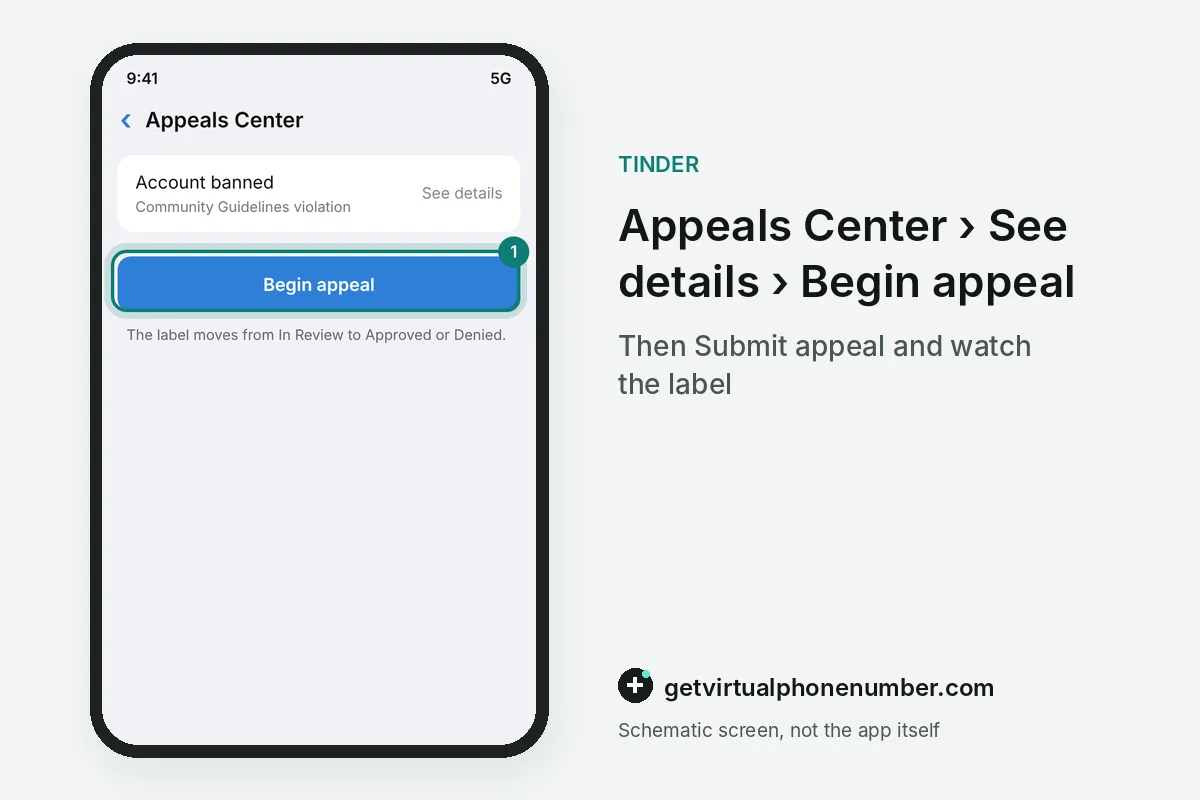
The help center at help.tinder.com explains the ban appeal. The Appeals Center lists each ban you can still appeal, and See details shows the violation behind it.
A banned account cannot keep using the app or create new accounts, and you learn about the ban from an email and a notice at login. If you believe the ban was a mistake, an appeal in the Appeals Center is the only route back. Nothing else reverses it.
Why Tinder bans accounts
Tinder bans accounts for breaking its Community Guidelines or Terms of Use, and knowing which rule applies makes a ban appeal easier to judge. The guidelines at policies.tinder.com list fake profiles, harassment, asking for money, spam links and selling services, and they cover behavior both on and off the app.
A warning system comes first, but a severe violation can lead straight to a ban without one. The guidelines also allow one account per person, so a second profile is itself a violation that an appeal cannot excuse. The company reserves the right to close accounts without refunding purchases.
Which violations can you appeal?
You can appeal bans, warnings and content removals that appear in the Appeals Center. If a violation is missing there, or shows no appeal option, it cannot be appealed through the center. The help center gives two common reasons.
The first reason is age: violations from more than 6 months ago drop out of the appeal window. The second is repetition, because a violation you already appealed cannot be appealed again. Check the center soon after the ban email arrives, while the 6-month window to appeal is still open.
Ban appeal mistakes to avoid
The worst ban appeal mistake is opening a new account instead. The help center says banned users cannot create new accounts. The one-person, one-account rule then makes a fresh profile another violation on top of the first, and it can sink the appeal you still have open.
Other mistakes cost time or money. Waiting more than 6 months closes the appeal window for good, and hostile or threatening messages break the guideline against harassing Tinder, Match Group or its affiliates. If you subscribed through an iPhone or Android device, cancel the subscription yourself, since the help center puts that step on you.
What happens after you submit a ban appeal?
After you submit a ban appeal, the violation moves to the Appealed tab with an In Review label. When the review ends, the label changes to Approved or Denied. No review time is published anywhere in the help center, so that label is the status to watch while you wait for a decision.
An approved appeal reverses the violation, which can mean a reinstated account, a cancelled warning or restored content. A denied appeal keeps the ban in place. During review the team may also find another violation, which then shows up as a new item you can appeal separately.
| Appeals Center label | What it means for the ban |
|---|---|
| In Review | Tinder is still checking the appealed violation |
| Approved | The violation is reversed and the account can be reinstated |
| Denied | The ban stands and the account stays closed |
| New violation | Review found another issue, which you may appeal too |
Your phone number and a ban appeal
Your phone number matters for a ban appeal because the Appeals Center uses the same login as your account. The app sends an SMS code when you log in with a phone number, so keep the number that is already on the account.
A new number is no substitute for a ban appeal. The help center says banned users cannot create accounts, and a fresh profile also breaks the one-account rule. For an account you keep, use your own SIM or a private number (coming soon). Public lines on our free Tinder numbers page are shared, and the Tinder phone number guide covers a blocked new number.
Appeal a Tinder ban in the Appeals Center
- Open the Appeals CenterSign in to the Appeals Center with the same phone number, email or linked login you use for the app.
- Review your violationsTap See details on each item to read what the ban is based on before you appeal.
- Select what to appealPick the violation, or every violation you want reviewed in the same appeal if there are several.
- Begin and submitTap Begin appeal, then Submit appeal to send the ban appeal for review.
- Watch the labelCheck the Appealed tab until In Review changes to Approved or Denied.
 Canada
 United States
 Netherlands
 Sweden
 Algeria
 Philippines
 Sri Lanka
 Slovenia
 United Kingdom